

The Safe Deployment Framework — For New Builds and Live Site Rebuilds
Problem — Why Website Changes Go Wrong
The moment a website changes, there’s risk.
A new site can get indexed by Google half-finished. A redesign can go sideways. A migration can quietly corrupt data in a way that doesn’t show up until days later.
Most of that risk isn’t really about skill. It’s about sequence — doing things in the wrong order, or skipping a step under time pressure, is what turns a routine project into an emergency.
The fix is a fixed sequence, followed every time — but the right sequence depends entirely on what kind of project it is.
Two Kinds of Projects, Two Different Risks
A brand new site on a brand new domain has nothing live yet to protect. The only real risk is a half-built site getting indexed and ranked by Google before it’s actually ready.
A rebuild or redesign of an existing site is the higher-stakes path. There’s something live to protect — real traffic, real rankings, sometimes a client’s only sales channel — and that changes everything about how the work gets done.
Two different situations. Two named sequences, one for each.
Chapter 1: Launching a New Site
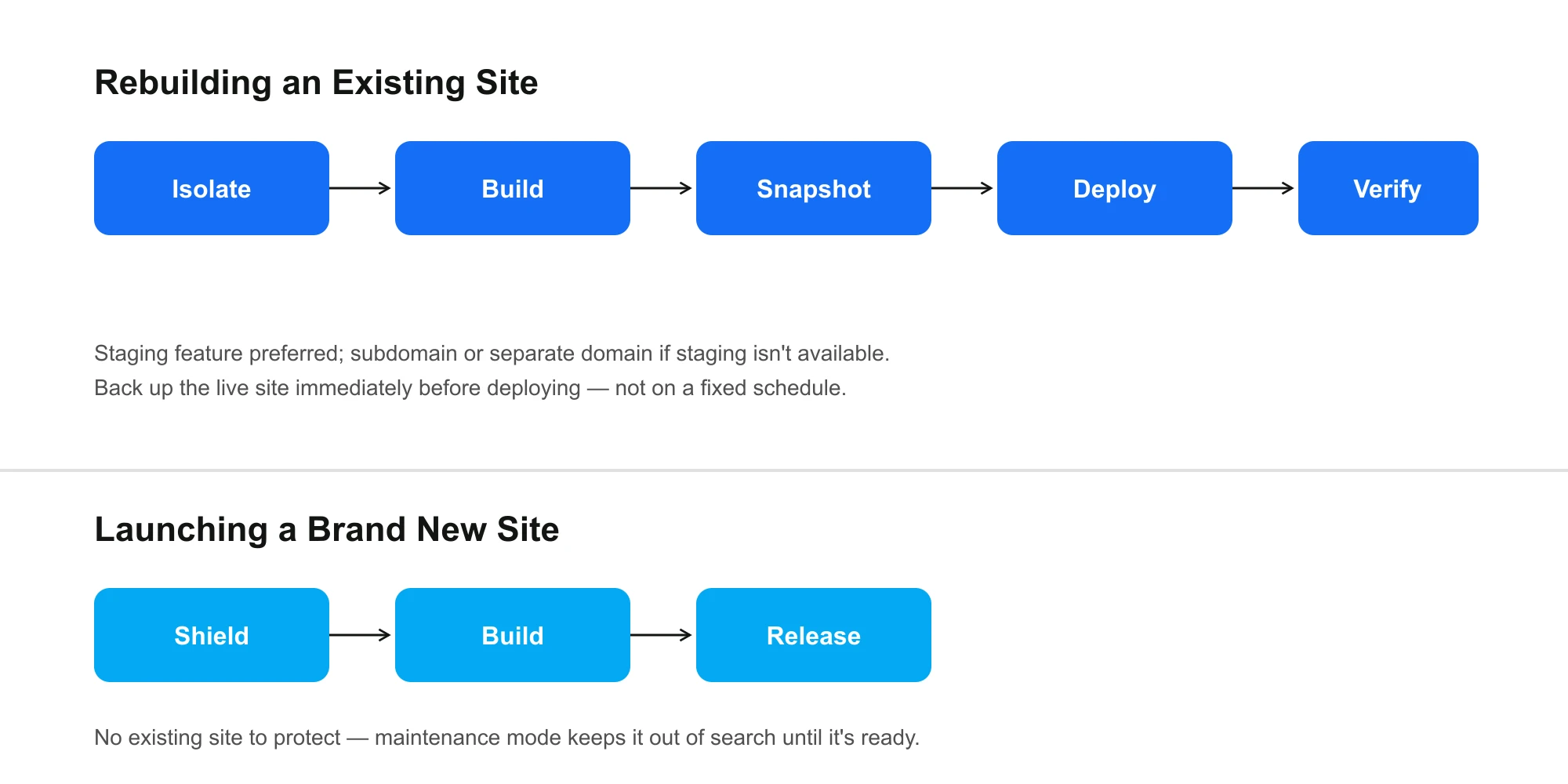
When there’s no existing site on the domain, there’s nothing to isolate or protect. The only job is keeping the unfinished site out of Google until it’s actually ready — which is a three-step sequence: Shield → Build → Release.
- Shield — turn on maintenance mode immediately, before any content goes up, so the incomplete site can’t get crawled or ranked while it’s still being built.
- Build — work directly on the live domain. There’s nothing to protect yet, so a separate environment would just add overhead for no reason.
- Release — once it’s ready, turn maintenance mode off. The site goes live for the first time already complete, not mid-build.
Simple, because the risk is simple: the only thing that can go wrong here is Google seeing the site before it’s ready. Shield removes that risk on day one, and it stays removed until Release.
Chapter 2: Rebuilding an Existing Site
This is the higher-stakes project type, because a real, working site already exists. The sequence has two more steps than a new build, because there’s more to protect: Isolate → Build → Snapshot → Deploy → Verify.
- Isolate — create a working environment that can’t touch the original site. First choice: the host’s native staging feature — built for exactly this, and the eventual push to live is a single click. If staging isn’t available, the fallback is a subdomain or a separate domain, used purely as temporary build space.
- Build — the entire rebuild happens inside that isolated environment. The live site keeps running, untouched, for the whole build.
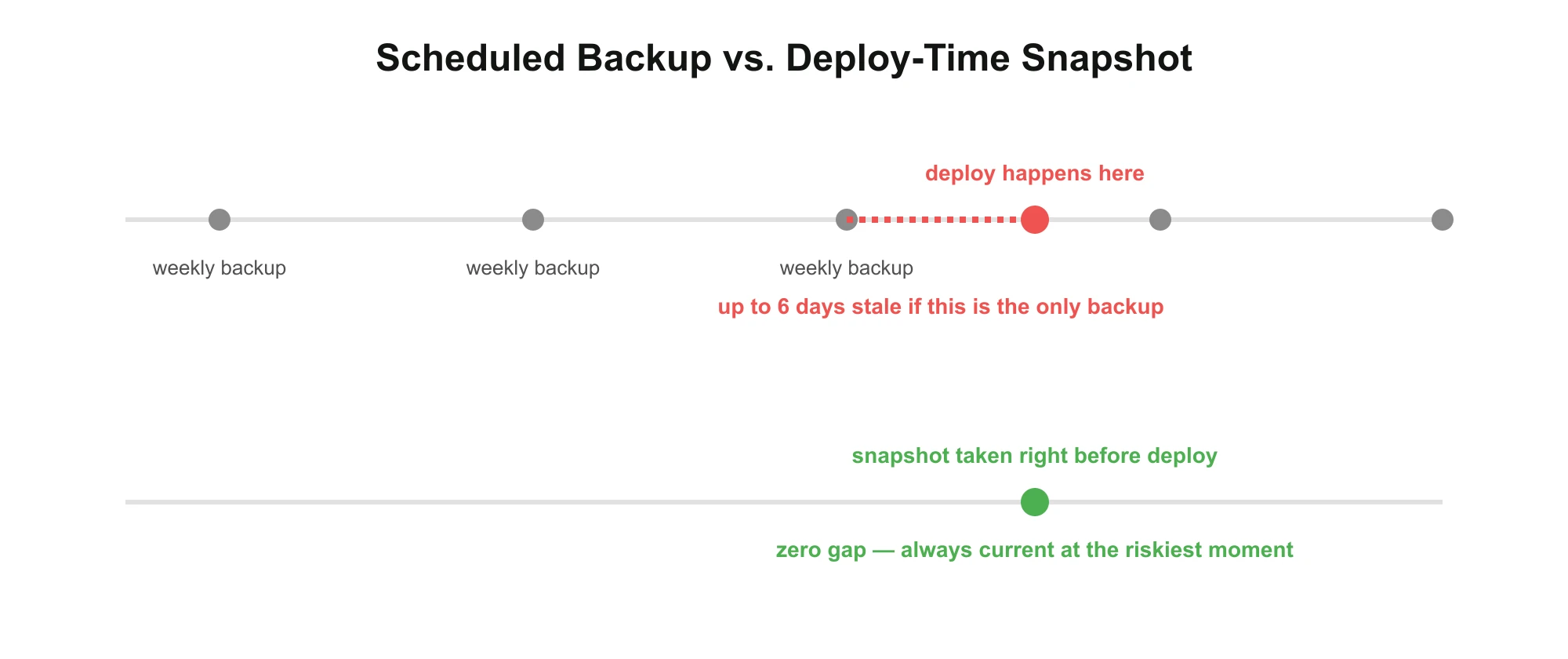
- Snapshot — right before deployment, not on a fixed schedule, back up the current live site. This is the one backup that actually matters for rollback, because it’s a snapshot of the exact thing about to be replaced.
- Deploy — push the finished build live. From native staging, this is one click. From a subdomain or separate domain, it means using a migration plugin to move the site over — more manual, and the step where problems most often show up.
- Verify — after deployment, confirm the live site is actually correct — not just that the deploy technically succeeded.
Why Snapshot Timing Matters More Than Schedule
A scheduled backup — weekly, say — is only as good as how recently it ran. If a deploy happens two days before the next scheduled backup, restoring from that backup afterward means losing everything that changed in between.
A snapshot taken at the moment of deployment has none of that gap. It’s always exactly current, right when the risk is highest.
Ongoing Protection: Sustain
Protection doesn’t end at launch, for either project type. Beyond the deploy-time snapshot, we rely on the host’s automatic scheduled backups — daily, weekly, or monthly depending on the plan — as continuous protection going forward. Restoring from a hosting-level backup, when it’s needed, is typically a one-click operation.
Plugin-based backups and manual local downloads are useful too, and we use both at different points — but a fast, reliable, one-click restore at the hosting level is the layer we trust most when something needs to be undone quickly.
For real options in this category, see our comparison of WordPress backup plugins and our hosting providers guide — staging and backup quality vary a lot between hosts, and it’s worth choosing one that actually has both.
Where This Process Actually Breaks
Two real failure points, from real projects — both specific to Chapter 2, since a new build has far less to go wrong:
- Manual migrations are the fragile step. Moving a site from a subdomain or separate domain into the final live domain with a migration plugin is noticeably trickier than a native staging push — it’s the step where problems most often surface.
- Scheduled backups get forgotten. If nobody actively checks that automatic backups are actually running — or ownership of that check falls through the cracks between people — a site can go weeks or months with no real backup at all, until the day it’s needed.
A few more worth guarding against, beyond what we’ve personally caught:
- An untested backup is a hypothesis, not a safety net. The only way to know a backup actually works is to restore it at least once before you need it for real.
- Caching can hide a successful deploy. On a site running a caching layer (we run LiteSpeed Cache on most builds), the live site can look unchanged for a few minutes after deployment simply because a cached version is still being served. Clearing cache is worth making an explicit part of Verify, not assumed.
- Database URL mismatches are the classic migration failure. Moving WordPress between domains or subdomains without a proper search-replace step corrupts serialized data in ways that are hard to trace back to the actual cause. A dedicated migration plugin handles this correctly; a manual file copy usually doesn’t.
- Forgetting to turn maintenance mode off is Chapter 1’s version of the same mistake: everything about the build goes right, and the finished site simply never becomes visible.
Why This Matters for Businesses
A rebuild is invisible to a client when it goes right — and it’s the only part they notice when it goes wrong.
Nobody asks their agency for a named deployment sequence. They ask for a website that doesn’t go down, doesn’t lose data, and doesn’t cost them a week of lost traffic during a redesign. The process is how that gets delivered quietly, every time, instead of by luck — whether the project is a brand new launch or a full rebuild.
Expert Insight — Safety Is a Sequence, Not a Feeling
“Be careful” isn’t a process. A named, repeatable sequence is what actually prevents mistakes under deadline pressure — because it doesn’t rely on anyone remembering to be careful in the moment. It just gets followed, the same way, every time, whichever chapter the project falls into.
Key Insight
The safest deployment isn’t the fastest one. It’s the one that’s identical every time.
Final Takeaway
Shipping a WordPress project safely isn’t about being extra cautious on any single project. It’s two fixed sequences — Shield, Build, Release for a new site; Isolate, Build, Snapshot, Deploy, Verify for a rebuild — applied the same way every time, so nothing important depends on memory or luck.
The riskiest moment in any website’s life is the moment it changes. A named process, matched to the right chapter, is what makes that moment boring instead of stressful.
Let’s Build Your Website — the Right Way
You bring the vision. We’ll design, develop, and optimize every detail.