
- WP Plugins
- |
- WordPress
Kadence Row Layout Block: Building Sections Without a Page Builder
By Ehasanul Haque
Posted on September 27, 2026
Just counted the nested rows on a Kadence page and felt a small panic?
Don’t. The homepage of this site is 19 Row Layout blocks and 39 Section blocks. That’s normal, and the nesting is the point.
The Kadence Row Layout block is a container that holds one or more Section blocks (columns) and controls their layout, gutter, padding, background, and alignment, so a page is built as a stack of rows instead of a page-builder canvas.
Every band you can see on onylogy.com (the hero, the logo strip, the work grid, the process grid, the about split, the client quotes, the blog grid) is one outer Row Layout. Inside most of them is a second Row Layout doing the actual grid.
That two-level pattern is the whole method. This post is that pattern, plus the six settings you’ll actually touch, taken from the live block markup rather than the docs. It’s the same pattern behind every section in the Kadence Blocks guide.
Coming from Elementor? Row Layout is the Section/Container, and Section is the Column. The names swapped.
It’ll take you a week to stop mis-clicking. Then you’ll be fine.
Let’s dive in.
What the Row Layout Block Is
**Row Layout is the layout block in Kadence Blocks: it renders a <div> (or a <section>, <article>, <main>, whatever you pick as its HTML tag) with a configurable number of columns.**
Each column is a Section block, which has its own padding, background, border radius, direction, and alignment settings. Everything else on your site goes inside a Section: your headings and text, your images, your buttons.
The defaults you inherit when you insert one: 2 columns, gutter default (2rem), no padding, alignment none (content width), vertical alignment top, mobile layout row (columns stack), HTML tag div.
The Pattern: Outer Row, Inner Row
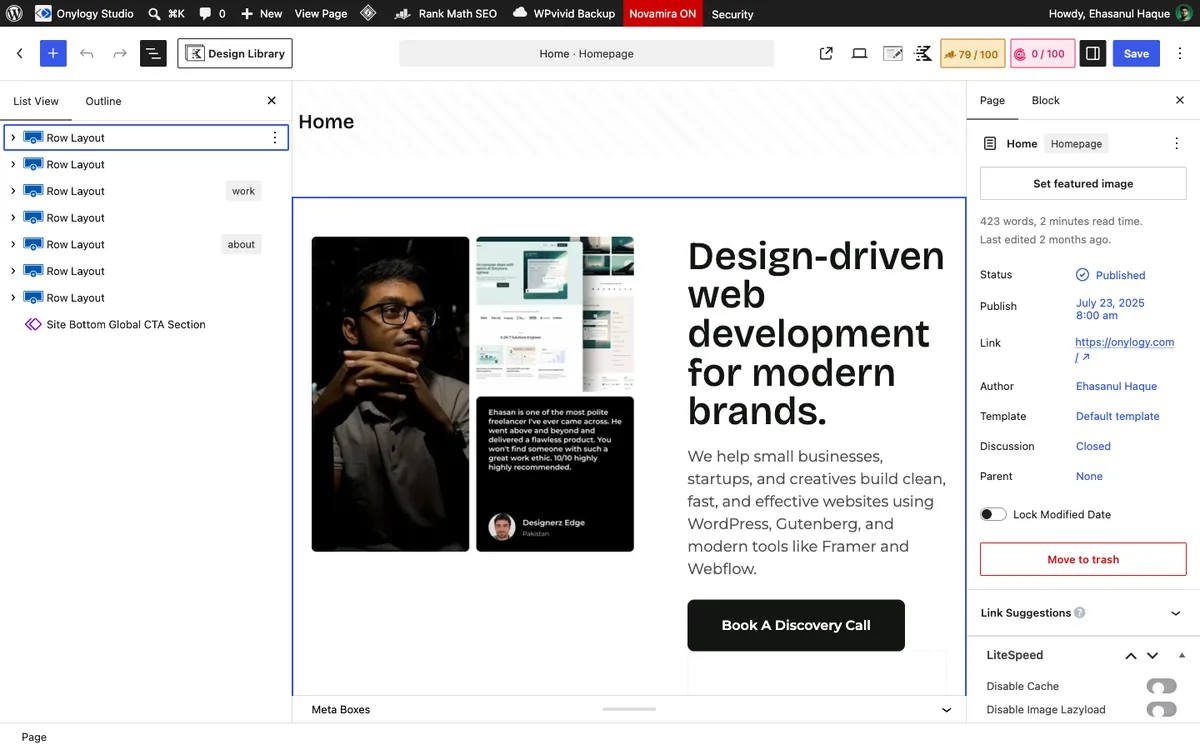
Here’s the hero on this homepage, from the markup:
Row Layout   align: full · colLayout: equal · columnGutter: wider (64px) · padding: lg top, xl bottom
  Section    direction: vertical
    Advanced Image (the photo)
  Section
    Advanced Text  h1
    Advanced Text  p, 1.125rem
    Advanced Button
    Row Layout   colLayout: left-golden · padding: 0
      Section  (stats)
      Section  (the "Hire me" label + icons)
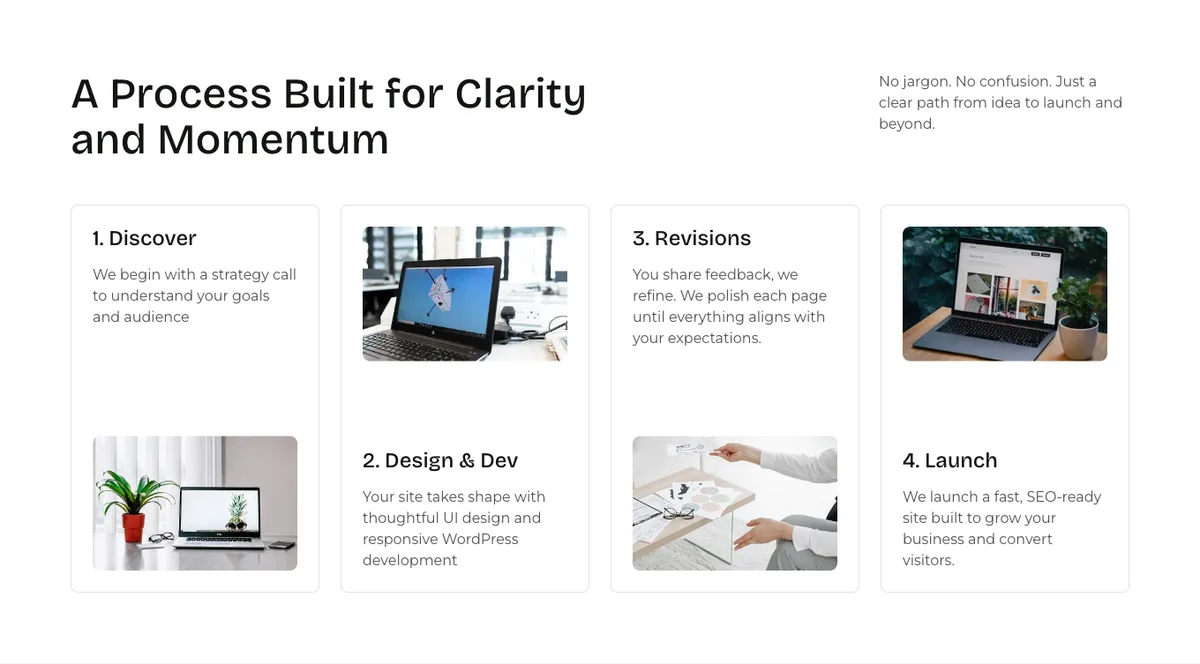
And the feature grid three sections down:
Row Layout   columns: 1 · align: full · padding: xxl top, xxl bottom
  Section
    Row Layout   colLayout: left-golden · padding: 0 · margin: lg bottom
      Section    Advanced Text h2
      Section    Advanced Text p
    Row Layout   columns: 4 · columnGutter: custom (24px) · padding: 0
      Section    borderRadius 8 · padding sm · verticalAlignment: space-between
      Section    borderRadius 8 · padding sm · direction: vertical-reverse on mobile
      Section    …
      Section    …
Same shape every time. Once you see it, you’ll see it on every page you build.
The outer Row Layout is the section: full width, one column, vertical padding from the named scale (xxl here, 3xl for the big one, lg and xl for the hero), and a background color if it’s an alternating band.
The inner Row Layouts are the grids: zero padding, a real column layout, a gutter.
The outer row is spacing and background. The inner row is structure. Keep them separate, and every section on your site has the same rhythm without you thinking about it.
Why the extra level? The outer row’s single Section is what gives you the content width. Its background runs edge to edge, but its one Section still sits inside the theme’s 1248px container.
Skip the outer row, and your background stops at the content edge. Not what you want.
The Six Settings That Matter
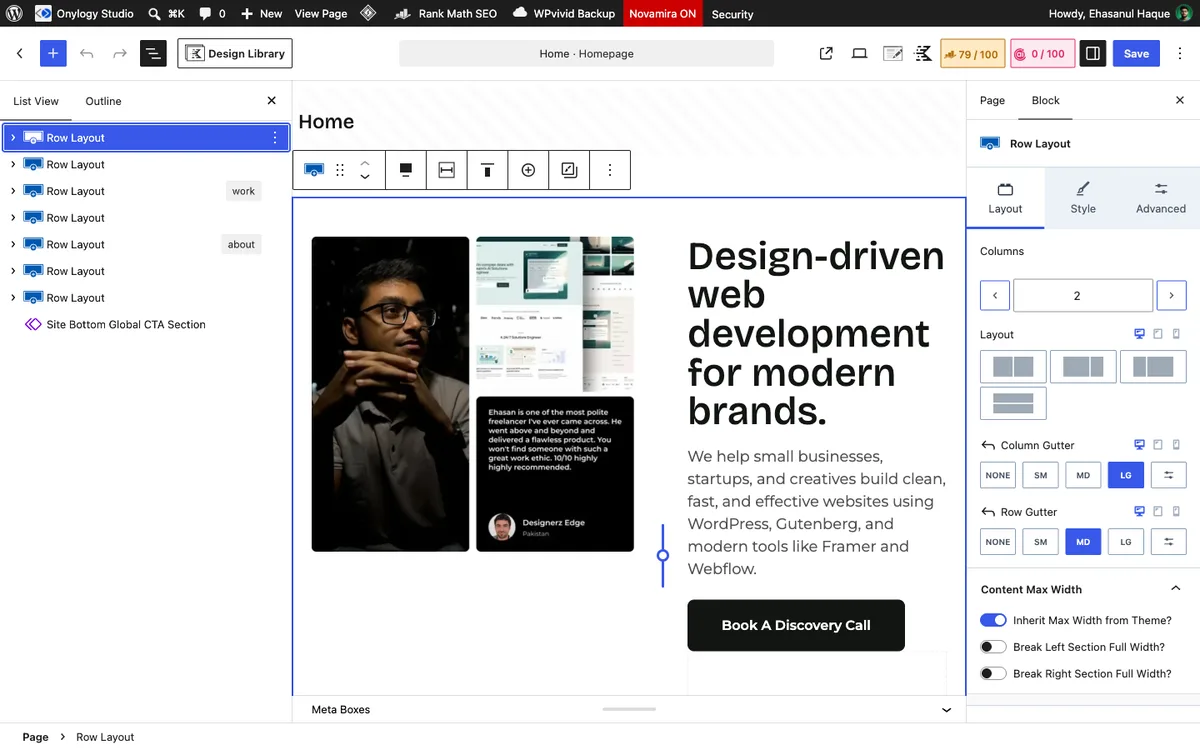
1. Columns and layout
colLayout is the column preset: equal for even splits, left-golden and right-golden for the roughly 62/38 golden split, plus half and wide-center variants.
Every heading-plus-button row on this site is left-golden (heading in the wide column, button in the narrow one, verticalAlignment: bottom so the button sits on the baseline). Your feature grids are equal with 3 or 4 columns.
That’s two layouts for a whole site. You won’t need more.
2. Gutter
The gutter is the gap between columns. Presets: skinny 1rem, narrow 20px, default 2rem, wider 4rem, widest 80px, or custom with a number.
| Where | Gutter | Why |
|---|---|---|
| Hero, About split | wider (64px) | Two big columns want air |
| Feature and card grids | custom, 24px | Cards read as a set, not a row of islands |
| Stat rows inside a card | skinny (16px) | Tight, related numbers |
3. Padding
Always the named scale, never pixels: lg 3rem, xl 4rem, xxl 5rem, 3xl 6.5rem for outer rows. 0 on every inner row.
The palette and typography post has the full scale. Mobile gets its own padding in the mobile tab, usually a step down.
4. Background color
Alternating sections get bgColor: "palette8" (the light gray) on the outer row, with the matching bgColorClass: "theme-palette8" the editor adds for you. Dark CTA sections get palette3.
Nothing else. No gradients, no background images on rows. Keep your photos in Advanced Image blocks inside Sections.
5. Full-width alignment
align: "full" on every outer row, so backgrounds run edge to edge. Inner rows stay at none.
If a section’s background stops short of the browser edge, this is the setting you forgot.
6. Vertical alignment
verticalAlignment on the Row Layout aligns its columns to each other: top (default), middle, bottom.
Your heading-and-button rows use bottom. Tabs content rows use middle, so a photo and a paragraph centre on each other.
That’s the six. Leave the HTML tag as div. Your one <h1> and your <h2>s carry the page structure; wrapping every band in <section> adds landmarks without adding meaning.
The Section Block, and Its Rename
The column block is registered as kadence/column and titled Section in the editor. It used to be titled Column.
Every tutorial from before the rename says “Column,” which is why you’ll search for a Column block and not find one.
Same block. Don’t worry.
Section settings worth knowing:
padding:smormdfor cards.borderRadius:[8, 8, 8, 8]for cards.direction:verticalorhorizontal, so a Section can lay out its children in a row without a nested Row Layout. That’s how the logo strip and the icon row are built.verticalAlignment: "space-between"on cards, so the image pins to the bottom and the text to the top.
The card grid on this homepage alternates direction: vertical-reverse on mobile for the even cards, so image and text swap order on a phone.
One attribute, no extra blocks.
The Trap: justifyContent Is Not justify-content
This one bites on real builds, so read it twice.
On a Section with direction: vertical, the attribute called justifyContent sets CSS align-items. The cross axis. Horizontal, in a vertical column.
And the attribute called verticalAlignment sets CSS justify-content, the main axis.
The names are the wrong way round from the CSS they produce.
Where it bites you: a width-constrained child inside a vertical Section, like an avatar with a max width, or a fixed-width button. You set verticalAlignment: middle expecting it centred, and it’s centred vertically and stuck to the left.
You need both: verticalAlignment for the vertical position and justifyContent: ["center", "", ""] for the horizontal one. Full-width children never show the problem, which is why it goes unnoticed until the one avatar.
Reordering Columns on Mobile
On desktop, the hero photo is on the left and the text on the right. On a phone, you want the text first.
Kadence has a Collapse Order setting for exactly this, under the Row Layout’s mobile tab. Try it first.
If you need an order the setting can’t produce, the block’s custom CSS box accepts a rule like order: -1 on a specific column.
Nesting: How Deep Is Too Deep?
The hero is three deep (row, section, row, section). The feature grid is three deep. Nothing on the site goes past four.
Kadence renders each level as one or two <div>s, so a three-deep section is maybe six wrappers around your content. That’s less than most page builders produce for a single widget.
The rule: if you’re nesting a Row Layout to get spacing, you’re doing it wrong, because padding and margin on a Section already do that for you. Nest for structure only: a grid inside a band, a stat row inside a card.
Can’t name what the inner row is for in one word (grid, split, row of stats)? Delete it.
Which Setup Should You Copy?
- Any section with a background: outer full-width Row Layout, one Section, named padding,
bgColorfrom the palette. Content inside. - A grid of cards: inner Row Layout,
equal, 3 or 4 columns,custom24px gutter, zero padding. Each card is a Section withsmormdpadding and 8px radius. - Heading on the left, button on the right: inner Row Layout,
left-golden,verticalAlignment: bottom. - A photo beside text: two-column outer row,
widergutter,verticalAlignment: middle. Don’t buy Split Content for this. - Something centred that isn’t full width: set both
verticalAlignmentandjustifyContenton its Section.
Copy those five and you’ve built most of a small business site. Simple as that.
Final Thoughts
Two levels, six settings, and a Section block that used to be called something else.
The 19 rows on this homepage are one pattern repeated. Once the pattern is in your hands, a new section is a minute’s work, and every section you build matches the last one.
Outer row for spacing and background. Inner row for structure. That’s it.
Over to you: what’s the deepest nesting on your homepage, and can you name what each level is for? Let me know in the comments.
Frequently Asked Questions
What is the Kadence Row Layout block?
It’s Kadence Blocks’ container block: a row with one or more Section (column) blocks inside, with controls for column layout, gutter, padding, background, and alignment. Every section of a Kadence page is built from it.
What’s the difference between Row Layout and Section in Kadence?
Row Layout is the row; Section is each column inside it. Section was previously named Column, which is why older tutorials use that name.
How do I make a Kadence row full width?
Set the Row Layout’s alignment to Full (the align: full attribute). The background then spans the browser width while the content inside stays within the theme’s container width.
How do I change the column order on mobile in Kadence?
Use the Row Layout’s Collapse Order setting under the mobile tab. If you need an order the setting can’t produce, the block’s custom CSS box accepts a rule like order: -1 on a specific column.
Why is my content stuck to the left inside a Kadence column?
Because verticalAlignment on a Section only sets the vertical axis. To centre a width-constrained child horizontally, also set the Section’s Justify Content control to center.
Should I use Kadence Row Layout or core Columns?
Inside a Kadence site, Row Layout, because its spacing scale, palette, and responsive controls match every other Kadence block. Core Columns work but bring a second spacing system.
Is nesting Row Layouts bad for performance?
Not at the depths a normal page needs. Nest for structure (a grid inside a band), never for spacing, and stay under four levels.
You May Also Like
-

Kadence Blocks vs Elementor
Stuck choosing between Kadence Blocks and Elementor? Good news: the… -
Kadence Global Palette & Typography
Ever had a client say “make the whole site darker”?… -
Kadence Blocks for WordPress
Building your WordPress site with Kadence Blocks? Good choice. It’s…