
- WordPress
WordPress Security for Beginners: A Simple Checklist
By Ehasanul Haque
Posted on August 4, 2026
Here’s a thought that keeps new site owners up at night: “What if my website gets hacked?” It’s a fair worry — but here’s the reassuring truth. Most WordPress sites get compromised through basic, avoidable gaps, not clever hacking. Weak passwords, outdated software, no backups. Close those gaps and you’ve already beaten the vast majority of attacks.
WordPress security for beginners comes down to a handful of simple habits: strong logins, regular updates, backups, and a good security plugin. You don’t need to be technical, and you don’t need to spend much (if anything). You just need to do the basics — consistently.
In this guide I’ll walk you through a practical, beginner-friendly security checklist you can complete today. It’s also the cure for several common mistakes beginners make, so it’s time well spent.
Key Takeaways
- Most hacks exploit weak passwords and outdated software — the basics stop them.
- Install one security plugin (like Wordfence) rather than several.
- Automatic backups are your safety net — set them up before anything goes wrong.
- Keep WordPress, themes, and plugins updated — updates patch security holes.
Why WordPress Security Matters (Even for Small Sites)
Every website is a target, even a brand-new one, because most attacks are automated bots probing thousands of sites for the same simple weaknesses. They’re not after you specifically — they’re after any door left unlocked. A hacked site can be defaced, used to send spam, or blocklisted by Google, which can wipe out your traffic overnight.
The good news repeated: you don’t need enterprise defenses. You need to lock the doors bots try first. Let’s go through them.
The WordPress Security Checklist
Work through these steps in order. Each one closes a common attack route, and none of them require code.
1. Use a Strong Username and Password
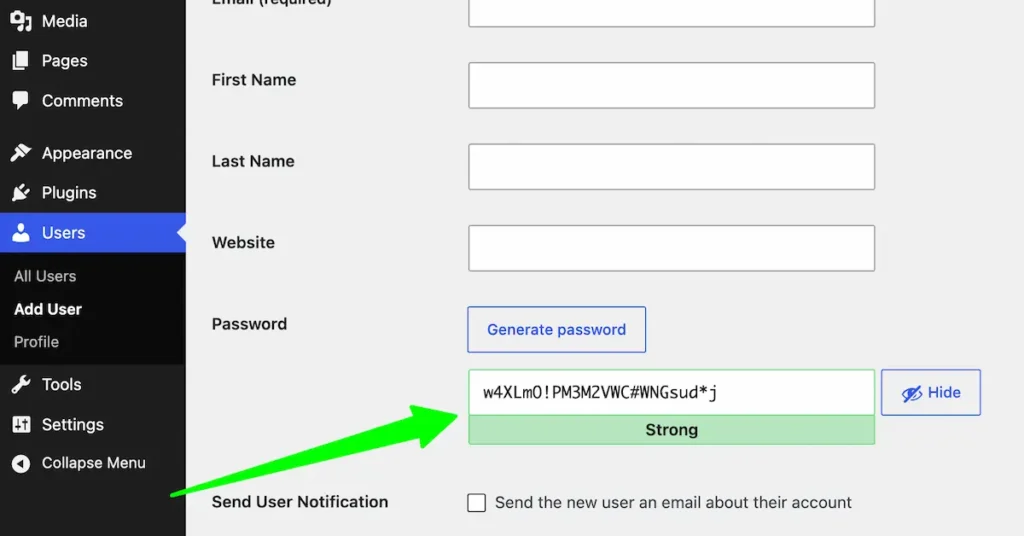
Never use “admin” as your username, and never reuse a password. A strong, unique password is your single most effective defense — most break-ins are just bots guessing weak credentials. Use a password manager to generate and store a long, random password, and change it if you ever suspect a leak.
2. Enable Two-Factor Authentication (2FA)
Two-factor authentication adds a second step to login — usually a code from your phone — so a stolen password alone isn’t enough to get in. Many security plugins include 2FA; turn it on for every admin account. It’s one of the biggest security upgrades for the least effort.
3. Keep Everything Updated
Outdated software is the number-one way sites get hacked, because updates often patch known security holes. Keep your WordPress core, themes, and plugins current — enable auto-updates where you can, and check your dashboard weekly. Delete any themes or plugins you don’t use; unused code is still a risk.
4. Install a Security Plugin
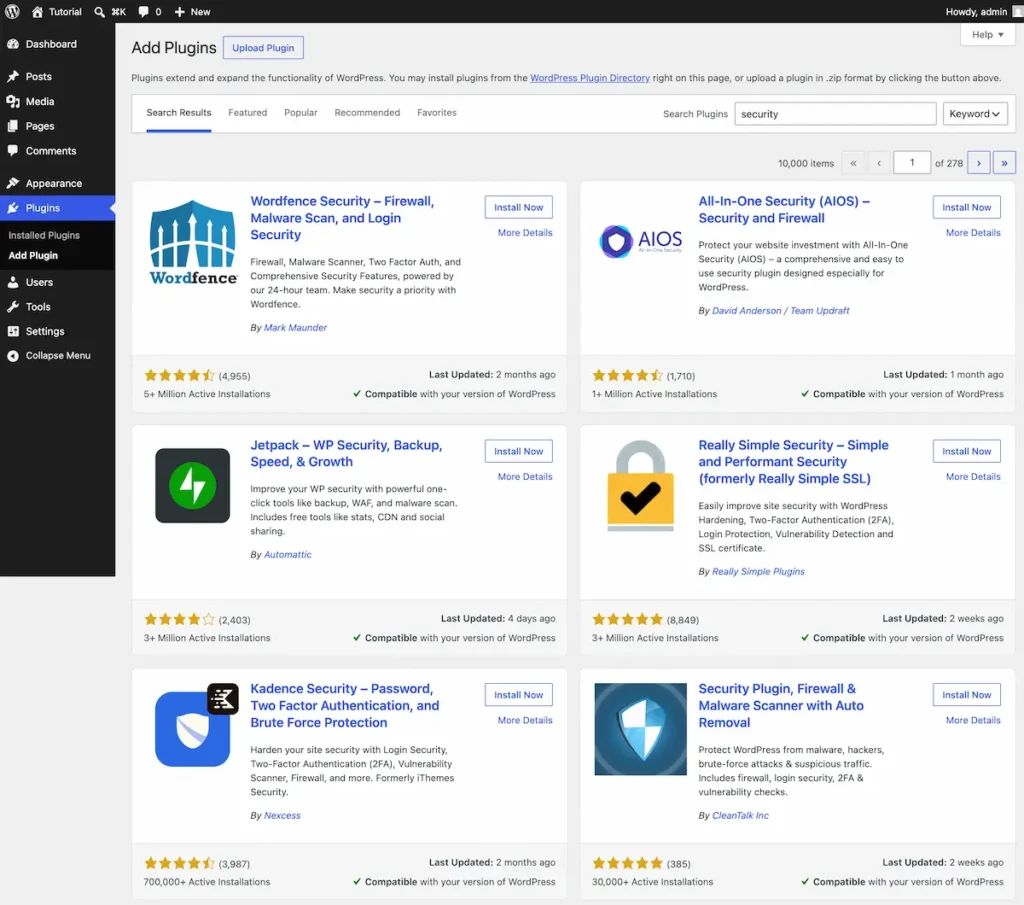
A security plugin acts as your site’s guard — adding a firewall, malware scanning, and login protection in one place. Install one reputable option (Wordfence is the beginner favorite) rather than stacking several, which can conflict. It’s on my must-have plugins list for exactly this reason.
5. Set Up Automatic Backups
A backup is a saved copy of your site you can restore if something goes wrong — from a hack, a bad update, or your own mistake. Use a backup plugin (like UpdraftPlus) to schedule automatic backups to cloud storage. Set this up before you need it, because the day you need a backup is the worst day to discover you don’t have one.
6. Use SSL (HTTPS)
SSL encrypts the connection between your site and its visitors, shown by the padlock and https:// in the address bar. Most good hosts include a free SSL certificate — just make sure it’s active. It protects data and it’s also a small Google ranking signal.
7. Choose Secure, Reputable Hosting
Your host is your first line of defense — good hosts add server-level firewalls, malware scanning, and isolation between sites. Cheap, low-quality hosting can leave you exposed no matter what you do. See my top hosting providers for WordPress for beginner-friendly, secure options.
What to Do If Your Site Gets Hacked
If the worst happens, don’t panic — most hacked sites can be recovered. Immediately change all passwords, put the site in maintenance mode, and run a scan with your security plugin to find and remove malicious files. If you have a clean backup, restoring it is often the fastest fix. For serious cases, many hosts and security services offer professional cleanup.
The single thing that makes recovery painless is having a recent backup — which is exactly why step 5 matters so much.
Conclusion
Security sounds scary, but as you can see, it’s really just a checklist. Strong logins, 2FA, updates, a security plugin, backups, SSL, and solid hosting — do those seven things and your site is safer than most on the internet. None of it is advanced, and most of it is set-and-forget.
Don’t wait for a scare to take it seriously. Run through this checklist on your site today, starting with your password and a backup plugin. Ten minutes now saves you a very bad day later.
Frequently Asked Questions
Is WordPress safe to use?
Yes. WordPress core is secure and actively maintained. Most security problems come from weak passwords, outdated plugins, or poor hosting — all of which you control.
What’s the best security plugin for beginners?
Wordfence is the most popular beginner-friendly choice, combining a firewall, malware scanning, and login protection. Install just one security plugin to avoid conflicts.
How often should I update WordPress?
As soon as updates are available. Enable automatic updates where possible and check your dashboard at least weekly, since updates frequently patch security vulnerabilities.
Do I really need backups?
Absolutely. Backups let you restore your site after a hack, a bad update, or a mistake. Set up automatic backups to cloud storage before you ever need them.
What is two-factor authentication and do I need it?
Two-factor authentication (2FA) requires a second login step, like a phone code, so a stolen password alone can’t get in. Yes, enable it on all admin accounts.
Does hosting affect my site’s security?
Yes. Quality hosts add firewalls, malware scanning, and site isolation. Cheap, low-quality hosting can leave you exposed, so choose a reputable provider.
You May Also Like
-

What Is Web Hosting
Want a website but have no idea where it actually… -
WordPress File Types Explained
Your WordPress site is made of files. Dozens of them,… -
What Is a JSON File?
You clicked a download button, and out came a file…