
- WordPress
What Is a JSON File? A Plain English Guide for WordPress Users
By Ehasanul Haque
Posted on October 1, 2026
You clicked a download button, and out came a file ending in .json.
Now what?
If you have ever exported theme settings, moved a block pattern between two sites, or followed a tutorial that said “import this file”, you have met JSON already. You just might not have known what you were looking at.
Here is the good news. JSON is one of the simplest file formats you will ever meet.
You don’t need to be a developer to understand it. You don’t even need to open one.
In this post you’ll find out what is a JSON file, how one gets made, what it’s actually for, and exactly how WordPress uses them. No coding required.
Let’s get into it.
What Is a JSON File?
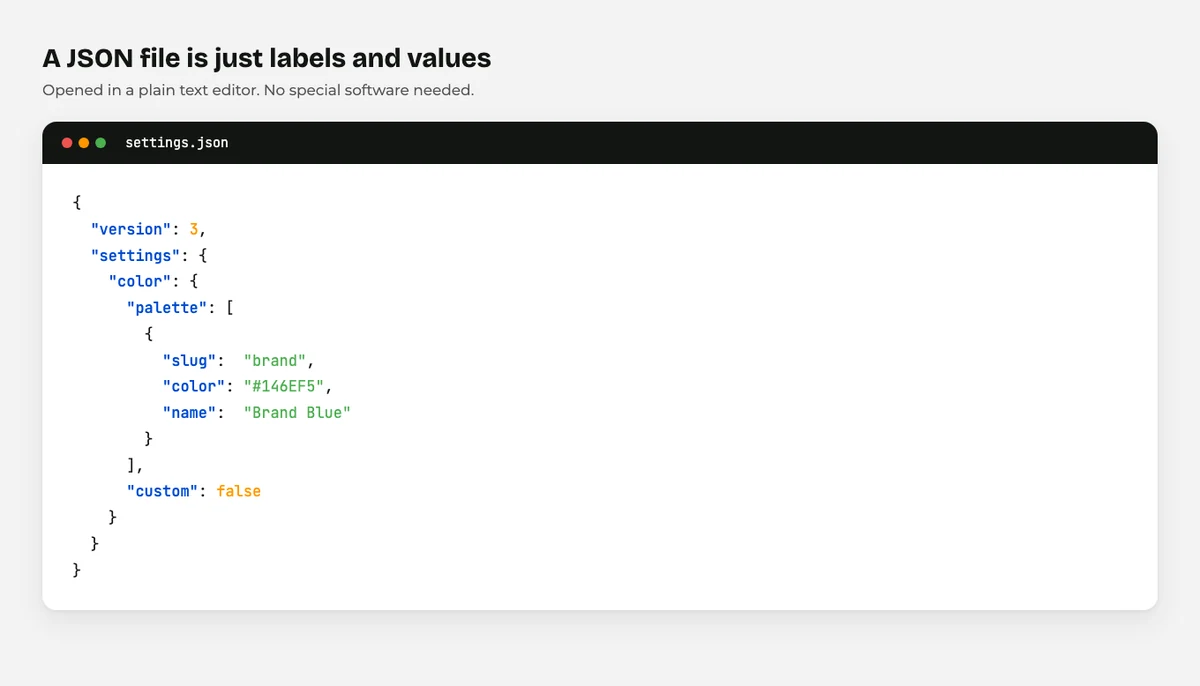
A JSON file is a plain text file that stores settings and data in a structured way that both people and software can read.
JSON stands for JavaScript Object Notation. The name sounds technical. The idea behind it is not.
Think of it as a very tidy list. Every piece of information has a label and a value, and the labels are always wrapped in quotes.
Here is a real one, shortened:
{
  "version": 3,
  "settings": {
    "color": {
      "custom": false
    }
  }
}
That’s it. A label, a colon, a value.
You can open a .json file in Notepad on Windows or TextEdit on a Mac and read it like a shopping list. No special software needed.
How Is a JSON File Made?
Most JSON files you’ll meet were made by software, not by a person typing.
When you click Export in a WordPress plugin, the plugin gathers your settings and writes them out as JSON. When a theme developer builds a block theme, they write a theme.json file by hand in a code editor.
Both routes produce the same kind of file.
You can make one yourself in about ten seconds. Open any text editor, type the example above, and save it with a .json ending instead of .txt.
The important part is the punctuation. Every opening brace { needs a closing brace }, every label needs quotes, and items in a list are separated by commas.
Miss one comma and the whole file stops working. That is the one thing about JSON that trips people up.
Most code editors, and the free validator at JSON.org, will tell you exactly which line is broken.
What Is a JSON File For?
JSON exists to move structured information from one program to another without either program having to guess.
Before JSON, moving settings between systems meant writing a custom format and hoping the other side understood it.
JSON fixed that. It’s readable by humans, it’s tiny, and almost every programming language can read and write it.
That combination is why it won. Websites, phone apps, and APIs all speak JSON now.
For you, the practical meaning is simple. When you see a .json file, you are looking at settings or data being packed up for travel.
What Is a JSON File Used For in WordPress?
WordPress uses JSON in four places you’ll actually run into. Here’s each one.
1. Theme settings, through theme.json
Modern block themes keep their colours, fonts, and spacing in a file called theme.json. It sits in the theme folder and tells WordPress how the site should look before you change a thing.
Change a value there and the whole site follows. It’s the reason block themes feel so consistent.
There’s a lot to it, so we cover it separately in theme.json explained.
2. Block patterns and templates
When you export a block pattern, a reusable section, or a full template, WordPress writes it as JSON.
That file holds the layout, the content, and every setting on every block. Drop it into another site and the section rebuilds itself.
Kadence works the same way. Its pattern library imports and exports through Import from JSON under Appearance, and its block settings export as JSON too. If you build with it, our Kadence Blocks guide walks through where those screens live.
3. Plugin settings
Most serious plugins let you export your configuration so you can reuse it on the next site.
Backup plugins, form plugins, SEO plugins: they nearly all use JSON for this. Set one site up properly, export, import, done.
That one habit saves hours. On the client sites I build, exported settings files are the first thing that moves to a new project.
4. The WordPress REST API
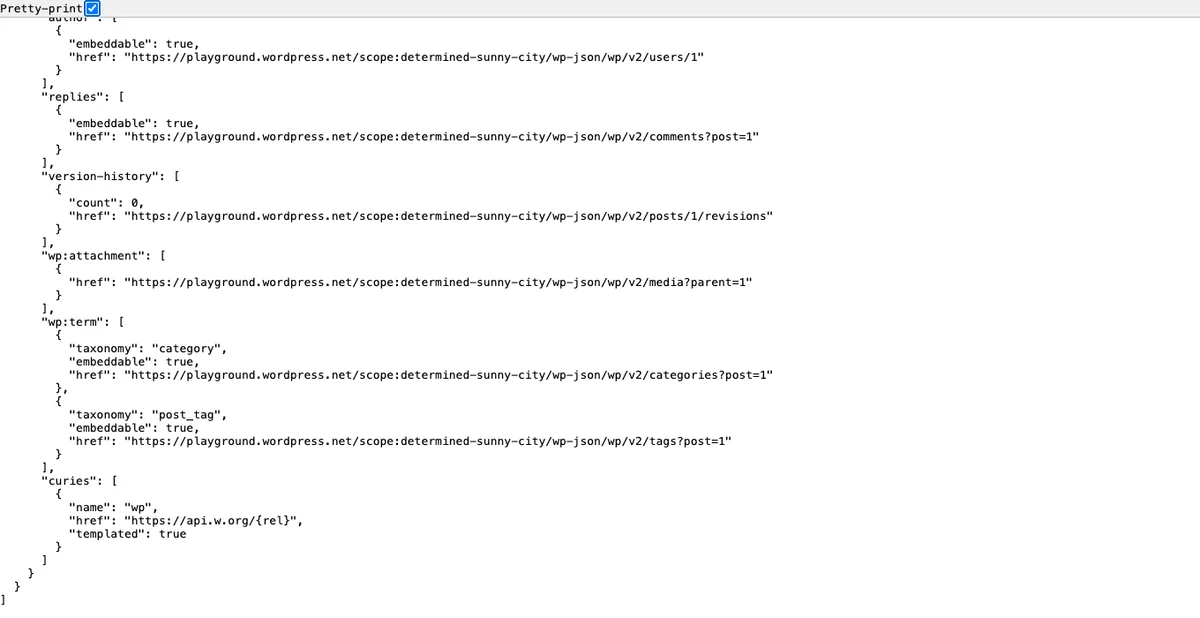
Every WordPress site has a built in REST API that hands out your content as JSON.
You can see it right now. Add /wp-json/wp/v2/posts to the end of any WordPress site’s address and your browser will show a wall of JSON.
That’s how apps, headless front ends, and other websites read your content.
Why Can’t You Upload a JSON File to the Media Library?
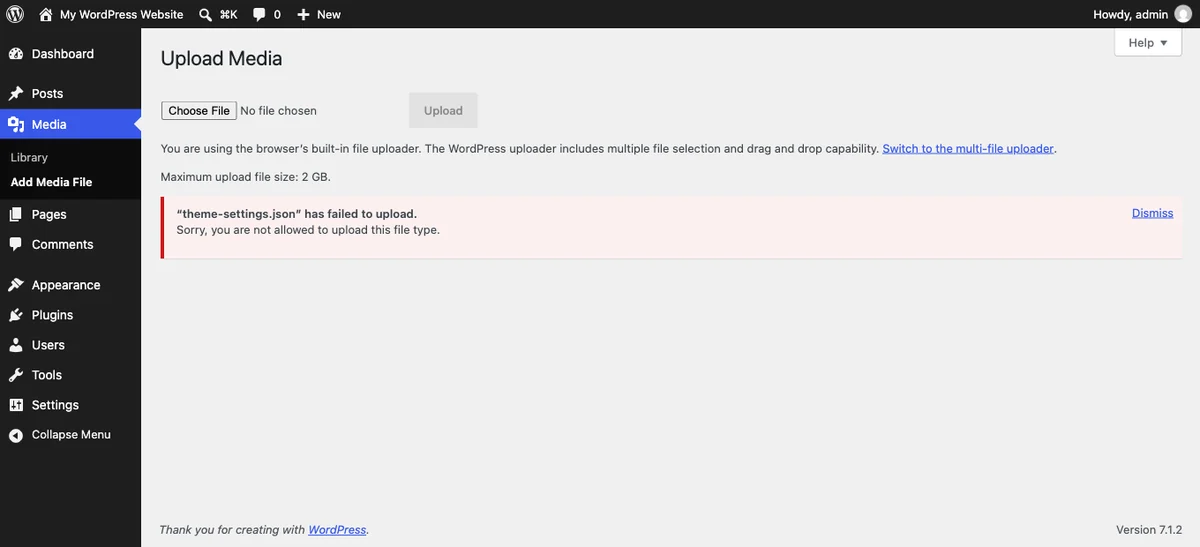
Because WordPress does not allow it, on purpose.
Try to drag a .json file into the Media Library and you’ll get “Sorry, you are not allowed to upload this file type.”
That is not a bug. WordPress keeps a fixed list of file types it accepts in wp_get_mime_types(), and JSON is not on it (checked September 2026). Neither are .xml or .sql. CSV and ZIP are.
The reasoning is sensible. The Media Library is a public folder, and a file full of settings has no business sitting in it.
So how do you get a JSON file into WordPress? Not through the Media Library.
How to Import a JSON File Into WordPress
You import JSON through the tool that made it. Every time.
That’s the rule worth remembering. A theme settings file goes back into the theme’s own import screen. A form plugin’s export goes into that form plugin. A Kadence pattern goes into the Kadence pattern importer.
There is no single “import JSON” button in WordPress, and there never will be, because the file could mean anything.
Three quick steps that work for almost every plugin:
- Find the plugin’s own Tools, Import/Export, or Settings screen.
- Choose the
.jsonfile from your computer. - Import, then check the settings screen to confirm the values actually landed.
Take a backup before you import anything that overwrites settings. If you want the safe ways to touch files at all, read how to edit WordPress files safely first.
What Is a JSON File Error? Four Common Problems
Four problems cover nearly every JSON error you’ll see.
The file is broken. A missing comma or brace makes the whole file unreadable. Paste the contents into a JSON validator and it’ll point at the line.
You’re importing it into the wrong tool. A Kadence pattern file will not import into a form plugin. The error usually says “invalid file” when it means “wrong file”.
The versions don’t match. An export from a much newer version of a plugin can carry settings the older version doesn’t recognise. Update both sides first.
Your editor renamed it. Windows sometimes saves settings.json as settings.json.txt. Turn on file extensions in your file browser and check.
None of these break your site. They just stop the import, which is exactly what you want them to do.
Final Thoughts
So, what is a JSON file? A text file with labels and values. That is genuinely all it is.
Once you know that, the scary looking download from a plugin export screen turns into something ordinary. It’s your settings, written down.
The two things to hold onto: you import a JSON file through the tool that created it, and WordPress won’t let you put one in the Media Library. Everything else follows from those.
If you want the bigger picture, our guide to WordPress file types covers every file you’ll meet, and what is an XML file covers JSON’s older cousin.
Over to you: which plugin’s settings are you exporting first? Tell me in the comments.
Frequently Asked Questions
Can I open a JSON file on my computer?
Yes. Any text editor will open it, including Notepad on Windows and TextEdit on a Mac. Right click the file, choose Open With, and pick your editor.
Is a JSON file safe to open?
Opening one in a text editor is completely safe, because it’s just text. Importing one into your site is the risky part, so only import files from a source you trust.
Why won’t WordPress let me upload a JSON file?
JSON is not on WordPress core’s list of allowed upload types, so the Media Library rejects it. You import JSON through the plugin or theme that created it instead.
What is the difference between JSON and XML?
Both store structured data, but JSON is shorter and easier to read. XML uses opening and closing tags around every value, which makes the same information much longer.
Can I edit a JSON file by hand?
You can, as long as you keep the punctuation exact. Copy the file first, make your change, and run it through a validator before you import it.
What is a JSON file in a WordPress theme?
It’s a JSON file inside a block theme that sets the site’s colours, fonts, spacing, and layout defaults. Version 3 of the format shipped with WordPress 6.6.
Does a JSON file slow down my website?
No. These files are tiny and most of them are read once during an import, not on every page load.
You May Also Like
-

What Is Web Hosting
Want a website but have no idea where it actually… -
WordPress File Types Explained
Your WordPress site is made of files. Dozens of them,… -
How to Edit WordPress Files
A tutorial told you to “add this code to your…