

- WordPress
How WordPress Uses a Zip File (And Why Yours Won’t Install)
By Ehasanul Haque
Posted on October 1, 2026

You already know what a zip file is.
It’s a folder squashed into one file so it travels as a single download. Nothing mysterious, and no technical knowledge needed.
What’s less obvious is how much of WordPress runs on them, and why yours refuses to install.
That’s what this post is about. Not the format, but the job it does.
Don’t worry, every problem here has a two minute fix.
By the end you’ll know where a WordPress zip file shows up, what WordPress really checks inside one, and how to get past the upload limit.
Let’s get into it.
What Does WordPress Use a Zip File For?
WordPress uses a WordPress zip file as its delivery format for anything you install.
Themes, plugins, and most backups all arrive as one. WordPress unpacks it for you.
So why do so many installs fail? Because WordPress doesn’t just unzip the file and dump the contents anywhere.
It expects a very particular shape inside.
What Has to Be Inside a WordPress Zip File?
One PHP file with a plugin header. That’s the real rule, and it is not the one most articles give you.
Open a proper plugin zip and you’ll usually find a single folder at the top:
akismet.zip
└── akismet/
    ├── akismet.php     <- this file carries the plugin header
    ├── readme.txt
    └── ...
The part WordPress actually checks is the top of akismet.php:
<?php
/**
 * Plugin Name: Akismet Anti-spam
 * Version: 5.3
 */
No Plugin Name: line, no install. WordPress reads the headers from the PHP files in the package, and if none of them names a plugin it refuses the whole thing.
What about the folder? Modern WordPress is relaxed about it. I tested this on WordPress 7.1.2 in September 2026: a zip with the files loose at the top level installed perfectly well, because WordPress creates the folder itself.
So the old advice that you must always have exactly one folder inside is out of date. Helpful, tidy, and not actually required.
Where Will You Meet a WordPress Zip File?
Four places, and you’ve probably used at least two already.
Installing a plugin
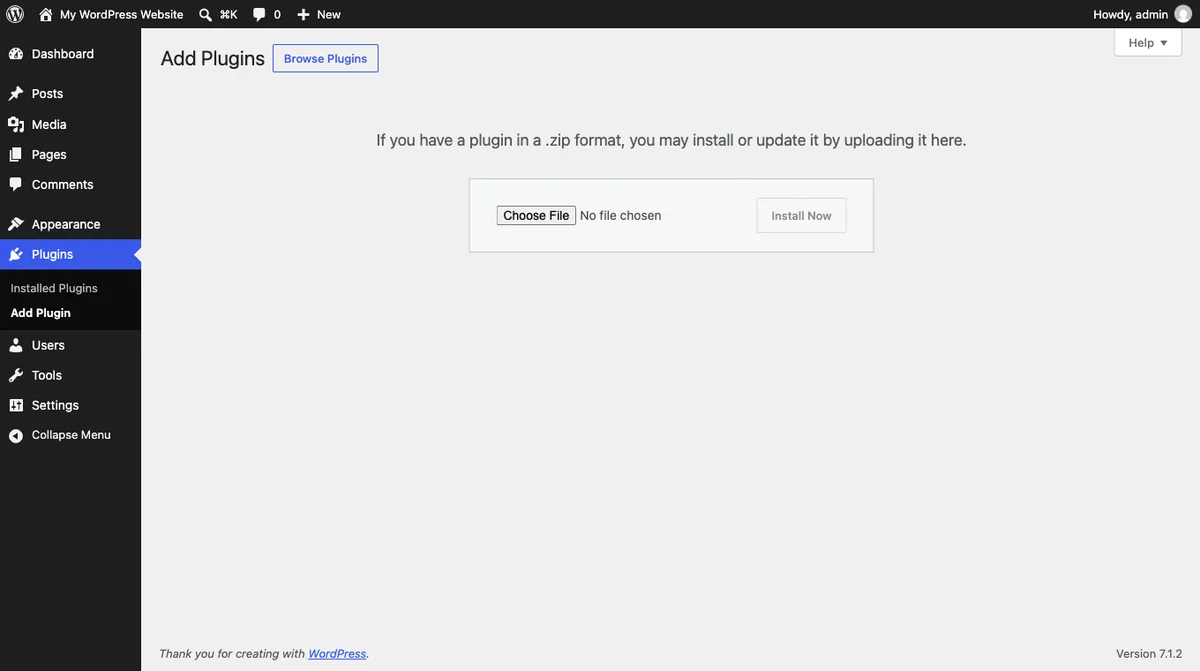
Go to Plugins > Add New > Upload Plugin and you get a picker that accepts one thing: a zip.
This is how you install anything outside the WordPress.org directory.
Installing a theme
Same idea, under Appearance > Themes > Add New > Upload Theme.
Premium themes almost always arrive this way.
Updates behind the scenes
Every automatic update you’ve clicked downloaded a zip and swapped the old folder for the new one.
You never see it happen.
Backups
Most backup plugins package your files into a zip.
If you want the full routine, our guide on how to back up your WordPress site covers what actually needs saving.
Can You Upload a Zip to the Media Library?
Yes, and this one surprises people.
Zip is on core’s list of allowed upload types as application/zip (wp_get_mime_types(), September 2026).
So you can attach a zip to a post as a download.
Just remember the Media Library is public.
Why Your WordPress Zip File Won’t Install
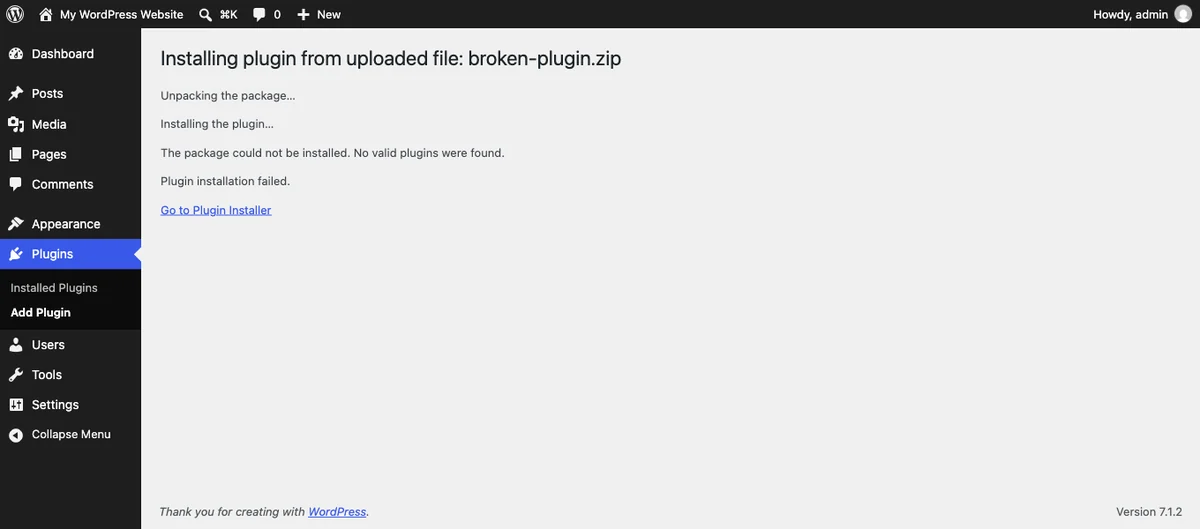
Five reasons cover nearly every failure.
“The package could not be installed. No valid plugins were found.” Nothing in the zip carries a plugin header. Open the main PHP file and check it starts with a comment block containing Plugin Name:. This is also what you get if you accidentally zipped a theme and uploaded it on the plugin screen.
You downloaded from GitHub. A GitHub “Download ZIP” gives you a folder named something like plugin-name-main, with the branch name stuck on the end.
It will usually install. The problem comes later: the plugin now sits in a folder with the wrong name, so updates do not find it and any code expecting the real folder name breaks.
Rename the folder to the plugin’s real name and re-zip it before you upload.
The file is bigger than your upload limit. The most common one by far, and nothing to do with the zip. Your host caps uploads, often at 2MB or 8MB, and a big theme sails past it.
Your Mac unzipped it for you. Safari expands downloads automatically, so you end up with a folder rather than a zip. Turn off “Open safe files after downloading”, or re-zip the folder.
You zipped the wrong thing. Zipping the files inside a folder is not the same as zipping the folder. Right click the folder itself.
How to Fix the Upload Size Limit
Wondering what your limit actually is? It’s printed on the upload screen: “Maximum upload file size: 2 MB.”
Three ways past it, easiest first.
- Ask your host. Most will raise it in a support chat in two minutes. Try this first.
- Change it in the hosting panel. Many dashboards have a PHP settings page with
upload_max_filesizeandpost_max_size. Raise both, because the smaller one wins. - Install it by file transfer. Unzip it and upload the folder straight into
wp-content/plugins/over FTP. Our guide to editing WordPress files safely covers getting in.
Option one is permanent and free. Start there.
Final Thoughts
A zip is just a squashed folder, and WordPress cares about one thing inside it.
A PHP file with a plugin header, and it installs. Miss that, or hit your host’s upload limit, and you get an error that sounds scarier than the problem is.
Neither will break your site. A failed install simply doesn’t happen.
For the bigger picture, our guide to WordPress file types covers every file you’ll meet, and if you’re still deciding what to install, start with the must have WordPress plugins.
Over to you: which install error did you land here for? Tell me in the comments.
Frequently Asked Questions
How do I install a plugin from a WordPress zip file?
Go to Plugins, then Add New, then Upload Plugin, choose your zip, and click Install Now. Activate it once the install finishes.
Why does my WordPress zip file say no valid plugins were found?
No PHP file in the zip has a Plugin Name: header, so WordPress cannot see a plugin in it. Check the main PHP file, or make sure you are not uploading a theme on the plugin screen.
Can I upload a zip file to the WordPress Media Library?
Yes. Zip is allowed by default, so you can attach one to a post as a download. Do not put anything private in there, because media files are public.
Why won’t a GitHub zip install in WordPress?
GitHub adds the branch name to the folder inside the zip, so the folder name no longer matches what the plugin expects. Rename it and re-zip.
How do I increase the maximum upload size in WordPress?
Ask your host to raise it, or change upload_max_filesize and post_max_size in your hosting control panel. Both values need raising, because the lower one applies.
Is it safe to install a plugin from a zip file?
Only if you trust where it came from. A zip from the developer or WordPress.org is fine, but a “free” copy of a premium plugin from a random site often carries hidden code.
Do I need to unzip the file before uploading it?
No. WordPress unzips it for you, so upload the zip exactly as you downloaded it.
You May Also Like
-

What Is Web Hosting
Want a website but have no idea where it actually… -
WordPress File Types Explained
Your WordPress site is made of files. Dozens of them,… -
What Is a JSON File?
You clicked a download button, and out came a file…