

- WordPress
What Is a CSV File? A Plain English Guide for WordPress Users
By Ehasanul Haque
Posted on October 1, 2026

A plugin just asked you to “upload a CSV”.
You have no idea what that means, and the help text wasn’t much help either.
Don’t worry. This is one of the easiest file types you’ll ever deal with, and you already know how to make one.
If you can use a spreadsheet, you can use CSV. That’s genuinely the whole skill.
In this post you’ll learn what is a CSV file, how one gets made, why it exists, and how WordPress uses them. Then the handful of things that go wrong, so they don’t catch you out.
Let’s take a look.
What Is a CSV File?
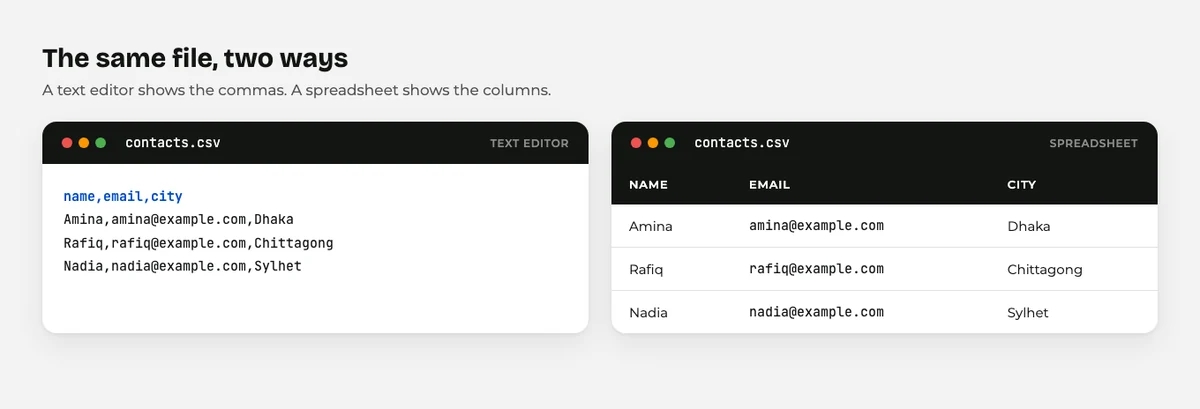
A CSV file is a plain text spreadsheet. Each line is a row, and commas separate the columns.
CSV stands for comma separated values.
The name is the explanation.
Here’s a real one, opened in a text editor:
name,email,city
Amina,amina@example.com,Dhaka
Rafiq,rafiq@example.com,Chittagong
Three columns. Two rows of data.
One header row at the top naming each column.
Open that same file in Excel or Google Sheets and it turns into a neat grid.
Same file either way.
That’s the trick to understanding CSV. It looks like a spreadsheet when a spreadsheet opens it, and like plain text when a text editor opens it.
How Is a CSV File Made?
You make one by saving a spreadsheet in a different format.
Open your data in Excel or Google Sheets, then choose File > Save As and pick CSV.
That’s it. Your .xlsx becomes a .csv.
Software makes them too.
When a plugin offers you an export of your orders, subscribers, or users, it writes the rows out with commas between them and hands you the file.
You can also write one by hand in Notepad, with a comma between each header.
The only rule worth remembering: the first row should name your columns. Almost every import tool expects that.
What Is a CSV File For?
CSV exists so that data can move between programs that know nothing about each other.
Your accounting software doesn’t speak to your email tool. Your bank doesn’t speak to your spreadsheet.
But all of them can read and write CSV.
It’s the lowest common language for rows and columns.
That’s also why it’s so limited.
A CSV holds values and nothing else. No formulas, no colours, no multiple sheets, no bold text.
If you save a styled spreadsheet as CSV, all the styling disappears. That surprises people the first time, so now you know.
How WordPress Uses CSV Files
WordPress itself does very little with CSV.
Plugins do almost all of it.
Here’s where you’ll actually meet one.
Importing products into WooCommerce
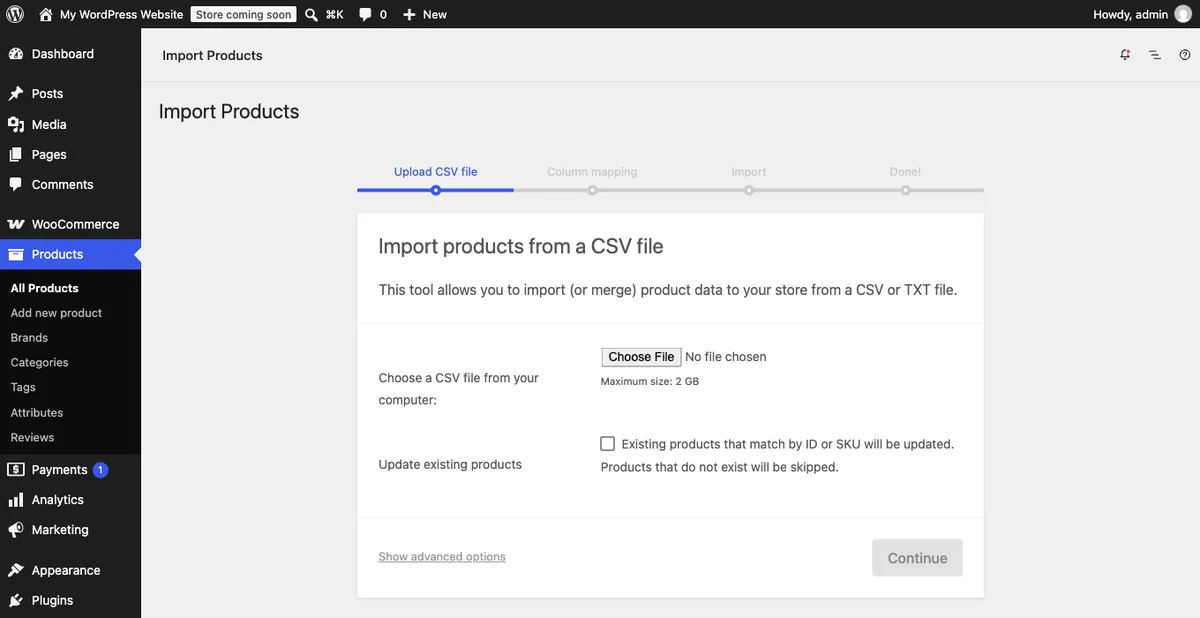
WooCommerce ships with a built in product CSV importer.
You upload a file of products and it creates or updates them in bulk.
For a shop with hundreds of items, this turns a week of typing into a ten minute job.
Bulk importing posts, pages, or users
Import plugins let you map CSV columns to WordPress fields.
Column one becomes the post title, column two the content, and so on.
It is how people move a site off another platform.
Exporting form entries and orders
Contact form plugins, order systems, and membership plugins nearly all offer a CSV export.
It’s how you get your data out and into a spreadsheet.
Worth checking before you commit to any plugin.
If a plugin can’t export your data, your data is stuck in it.
Uploading to the Media Library
Here’s the surprise: WordPress does allow CSV uploads by default. It’s on core’s list of permitted types as text/csv (checked September 2026 in wp_get_mime_types()).
That’s unusual.
JSON, XML, and SQL are all blocked, but CSV is allowed.
Just because you can upload one doesn’t mean you should. A CSV in the Media Library sits at a public web address, so never put customer data there.
What Is a CSV File Error? Five Common Problems
Five problems cover nearly all of it.
Commas inside your data. An address like “Dhaka, Bangladesh” contains a comma, so the importer reads it as two columns. Wrap the value in double quotes and the problem goes away. Spreadsheets do this for you automatically.
The wrong encoding. Bangla, Arabic, or accented characters turn into gibberish when the file is saved in the wrong encoding. Save as CSV UTF-8 and they survive.
Excel eating your data. Excel loves to turn long numbers into scientific notation and to strip leading zeros from postcodes. Format those columns as text before you save.
Headers that don’t match. Most importers match your column names to their fields. A header named “E-Mail” when the tool wants “email” means that column gets skipped.
A file that is secretly still a spreadsheet. Renaming products.xlsx to products.csv does not convert it. You have to save as CSV properly.
Every one is fixable in under a minute.
None of them will break your site.
Wrapping It Up
So, what is a CSV file? A spreadsheet stripped down to its bare values, with commas doing the work that columns do on screen.
Where will you meet one? Any time data needs to move: products in, subscribers out, form entries into a spreadsheet.
Save as CSV UTF-8, put your headers in row one, and quote anything containing a comma. Do those three things and imports mostly just work.
For the wider picture, our guide to WordPress file types covers every file you’ll run into. CSV’s closest relatives are covered in what is a JSON file and what is an XML file, and if you’d rather not touch files at all, how to edit WordPress files safely has the gentler routes.
Over to you: what are you importing first? Let me know in the comments.
Frequently Asked Questions
How do I open a CSV file?
Double click it and your spreadsheet program will open it as a grid. To see the raw text instead, right click and open it with Notepad or TextEdit.
What is a CSV file in Excel?
It’s the same file, just displayed as rows and columns. Excel can open and save CSV, but it won’t keep formulas or formatting when you save in that format.
Is CSV the same as Excel?
No. An Excel file can hold formulas, styling, and several sheets. A CSV holds plain values on one sheet and nothing else.
Can I upload a CSV file to WordPress?
Yes. CSV is one of the file types WordPress allows in the Media Library by default. Avoid uploading anything with personal data in it, because media files are public.
Why does my CSV import put everything in one column?
Your spreadsheet is probably expecting semicolons instead of commas, which happens in some regions. Use the import dialog to pick the right separator.
How do I fix strange characters in a CSV file?
Save the file again as CSV UTF-8 from your spreadsheet program. That encoding handles Bangla, Arabic, and accented letters correctly.
Does a CSV file have a size limit?
The format has none, but your host does. Very large imports usually fail on the upload size or the PHP time limit, so split big files into smaller batches.
You May Also Like
-

What Is Web Hosting
Want a website but have no idea where it actually… -
WordPress File Types Explained
Your WordPress site is made of files. Dozens of them,… -
What Is a JSON File?
You clicked a download button, and out came a file…