

- WordPress
WebP vs JPEG vs PNG vs AVIF: Which Image Format Should You Use in WordPress?
By Ehasanul Haque
Posted on October 1, 2026
Your pages are loading slowly, and someone told you it’s your images.
They’re probably right. Images are the heaviest thing on most WordPress pages by a long way.
So which format should you actually save them in?
Here’s the short version, and you can stop reading after this if you like. Use WebP for almost everything. Keep PNG only when you need a transparent background and WebP won’t do.
The rest of this post explains why, so you can make the call yourself next time.
In the WebP vs JPEG question, there’s a clear winner, but PNG still has one job nobody else does well. Let’s take a look.
What Is JPEG?
JPEG is the old, universal photo format that throws away detail to make files smaller.
It’s been around since the early 1990s.
Every camera, phone, and browser you own can read one, so you never have to think about compatibility.
The clever part is that it discards information your eye probably won’t miss. Save at 80% quality and the file shrinks dramatically while still looking fine.
The catch: that thrown away detail never comes back.
Re save the same JPEG over and over and it slowly turns to mush.
JPEG also cannot do transparency. Every JPEG is a solid rectangle.
What Is PNG?
PNG is the format that keeps every pixel exactly as you saved it, and supports transparency.
Nothing is discarded.
A PNG of your photo looks pixel perfect.
It is also enormous.
That same photo as a PNG can easily be five times the size of your JPEG.
So PNG earns its place for a specific job: graphics with a transparent background, plus screenshots and flat illustrations with hard edges and few colours.
Logos, icons, product cutouts. Those are PNG territory, unless you have an SVG, which we cover in SVG files in WordPress.
What Is WebP?
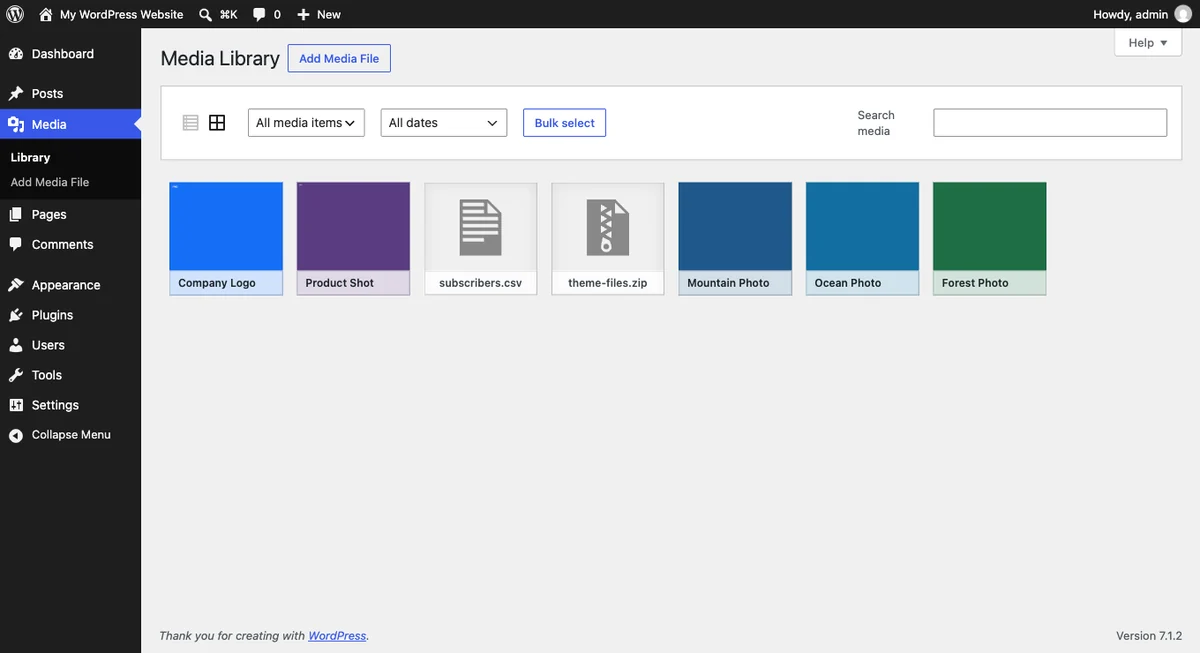
WebP is a newer format built by Google that does JPEG’s job and PNG’s job, in smaller files.
It compresses your photos like JPEG. It supports transparency like PNG.
It can even animate.
WordPress has supported WebP upload and display since WordPress 5.8, released in 2021 (WordPress Core). No plugin needed for the format itself.
Browser support is no longer a worry.
Every current browser reads WebP, so you don’t need a fallback plan.
That combination is why it wins for most WordPress sites. Same picture, smaller file, no compromise on transparency.
What About AVIF?
AVIF is the newest format, and it compresses even harder than WebP. Don’t worry, you don’t need it to get fast pages.
WordPress added support in WordPress 6.5 (WordPress Core). The same dev note reports savings of over 50% against JPEG and over 30% against WebP.
So why isn’t it the automatic answer? Two reasons.
Your host has to support it.
AVIF needs the right image library on the server, and not every host has one.
And it is slower to create.
Converting a large batch takes noticeably longer than WebP.
Worth testing if your host supports it. If it doesn’t, relax, WebP is plenty.
We Measured It: Three Photos, Three Formats
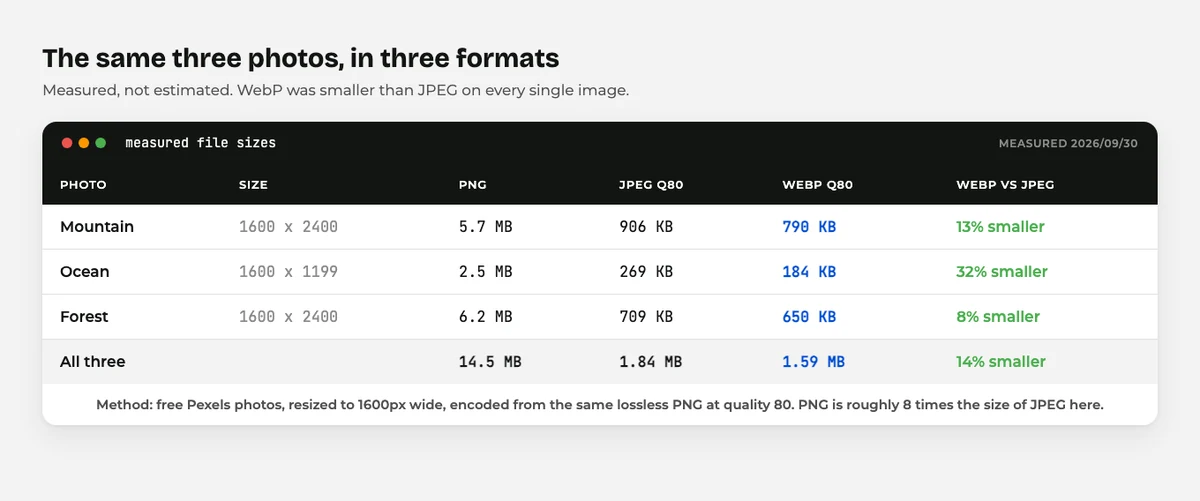
Rather than repeat someone else’s numbers, here is a test you can repeat yourself.
Three free nature photos from Pexels: a mountain, an ocean and a forest. Each resized to 1600 pixels wide, which is a realistic full width image on a page.
Then saved from the same lossless PNG at quality 80 in each format.
The actual bytes, measured on 30 September 2026:
| Photo | PNG | JPEG q80 | WebP q80 | WebP saving |
|---|---|---|---|---|
| Mountain | 5.7 MB | 906 KB | 790 KB | 13% |
| Ocean | 2.5 MB | 269 KB | 184 KB | 32% |
| Forest | 6.2 MB | 709 KB | 650 KB | 8% |
| All three | 14.5 MB | 1.84 MB | 1.59 MB | 14% |
Two things stand out.
WebP won every time. Never by a dramatic margin, but it was never larger either. The saving swung between 8% and 32% depending on the photo.
PNG is in a different league. Roughly eight times the size of the JPEG.
Save a photo as PNG and you are shipping eight times the bytes for no visible gain.
One honest caveat about AVIF. Quality numbers are not comparable between encoders, so a fair AVIF test needs a perceptual quality measurement rather than matching the number 80.
That is why AVIF is missing from the table, and why the savings quoted earlier come from WordPress Core rather than from this test.
WebP vs JPEG vs PNG: What Actually Separates Them
| Format | Transparency | Best for | Typical size | In WordPress since |
|---|---|---|---|---|
| JPEG | No | Photos, when you need maximum compatibility | Medium | Always |
| PNG | Yes | Logos, icons, screenshots, hard edges | Large | Always |
| WebP | Yes | Almost everything on a website | Small | 5.8 (2021) |
| AVIF | Yes | Photo heavy sites on a capable host | Smallest | 6.5 (2024) |
One row is doing most of the work there. WebP does both jobs, at a smaller size, and WordPress has handled it for years.
Which Image Format Should You Use?
Pick by what the image actually is.
- A photograph: WebP. Fall back to JPEG if something in your workflow refuses WebP.
- A logo or icon with transparency: SVG if you have it, WebP if not, PNG as the safe fallback.
- A screenshot: WebP. PNG if the text looks soft after conversion.
- A photo heavy portfolio on a good host: try AVIF, keep WebP as the fallback.
- An image for email or an old system: JPEG or PNG, because compatibility beats size there.
Notice what is missing from that list? Any situation where JPEG clearly beats WebP. There basically isn’t one on a modern website.
Do You Have to Convert Everything by Hand?
No. Please don’t.
An image optimization plugin converts your existing library in bulk and handles new uploads for you.
Most will serve WebP to browsers that want it and keep your original as a fallback.
That is the whole job, done once, in a settings screen. Our image optimization plugins roundup compares the options.
Two habits matter more than the format, honestly.
Resize before you upload. A 4000 pixel wide photo displayed in a 800 pixel column is wasted bandwidth in any format.
Compress, don’t just convert. WebP at 100% quality is not much smaller than a JPEG. Around 75 to 85% is where the savings live.
Both of those, plus the right format, and your images stop being the reason pages crawl. For the rest of it, read how to speed up your WordPress site.
Final Thoughts
WebP vs JPEG is not a close contest any more. WebP does everything JPEG does, plus transparency, in a smaller file, and WordPress has supported it since 2021.
PNG keeps one job: transparency when WebP is not an option, and flat graphics where every pixel must stay sharp.
AVIF is the future, and possibly your present if your host is up to it.
Test it, don’t chase it.
The simple rule to take away: WebP by default, PNG for transparency fallbacks, SVG for logos, AVIF if your host supports it. That covers every image you’ll ever put on a WordPress site.
For the wider picture, our guide to WordPress file types covers every file you’ll meet.
Over to you: what does your Media Library look like right now, mostly JPEG or already converted? Tell me in the comments.
Frequently Asked Questions
WebP vs JPEG: which is better for WordPress?
Yes, in almost every case. WebP produces a smaller file at similar quality and also supports transparency, which JPEG cannot do at all.
Does WordPress support WebP without a plugin?
Yes. WordPress has allowed WebP upload and display since version 5.8, so you can drag one into the Media Library like any other image.
Should I use PNG or WebP for a logo?
Use SVG if you have the vector file. If not, WebP is smaller than PNG and still supports transparency, so keep PNG only as a fallback.
What is the difference between WebP and AVIF?
Both are modern formats with transparency support. AVIF compresses harder but needs server support and takes longer to generate, so WebP is the safer default.
Will switching to WebP break my site on old browsers?
No. Every current browser reads WebP, and optimization plugins keep the original file to serve anywhere that cannot.
Does WebP vs JPEG actually change my page speed?
It helps, but resizing helps more. A huge image shrunk to the size it is actually displayed at saves far more than a format change alone.
Can I convert my existing images to WebP in bulk?
Yes. Image optimization plugins convert your whole Media Library in one pass and handle new uploads automatically from then on.
You May Also Like
-

What Is Web Hosting
Want a website but have no idea where it actually… -
WordPress File Types Explained
Your WordPress site is made of files. Dozens of them,… -
What Is a JSON File?
You clicked a download button, and out came a file…